Getting started
The FINCI Card API is available to approved organizations that operate or support card programs on FINCI issuing infrastructure.
This portal is written for the backend, product, and operations teams responsible for integrating those card capabilities into their own platforms and operating processes.
It is not a public self-service API. Access is available only within an approved FINCI program relationship.
In these guides, integrator means the approved organization implementing and operating the FINCI APIs and webhooks for a given program. Depending on the program model, the integrator may be a FINCI partner, a FINCI client, or another approved organization responsible for the integration.
Who this portal is for
This documentation is for organizations that use FINCI as their issuing and card-program infrastructure provider.
For the clearest reading path, review the target program model and supported services first, then move into the data model, issuance flow, and transaction-handling guides.
Use this page for portal orientation and the implementation journey. Use Definitions for shared terminology and Program models for program structures, platform capabilities, optional services, and responsibility split.
What this portal covers
This portal covers FINCI card programs delivered on the same issuing and processing foundation, including BIN sponsorship, co-branded programs, crypto MiCA-compliant programs, and commercial card programs integrated through FINCI APIs.
Some guides apply across all supported program structures. Others become relevant only when the agreed scope includes capabilities such as physical issuance, wallets, 3D Secure, integrator-managed authorization decisioning, or Payments API-based reconciliation.
Review the Program models guide first to confirm which parts of the portal apply to the target implementation.
Integration at a glance
FINCI acts as the issuing and card-program infrastructure layer.
- FINCI exposes APIs for setup and lifecycle management.
- FINCI delivers webhooks for authorization and transaction events.
- In integrator-managed decisioning setups, those webhooks also carry real-time authorization decision requests.
- The integrator connects its own platform, controls, and operational processes around that core card infrastructure.
The detailed authorization guides describe the integrator-managed decisioning path first, because that is the most common pattern for programs integrated through FINCI APIs and webhooks. Some programs instead use FINCI-managed decisioning as part of the agreed decisioning model.
Integration surfaces
This portal separates the integration into two surfaces:
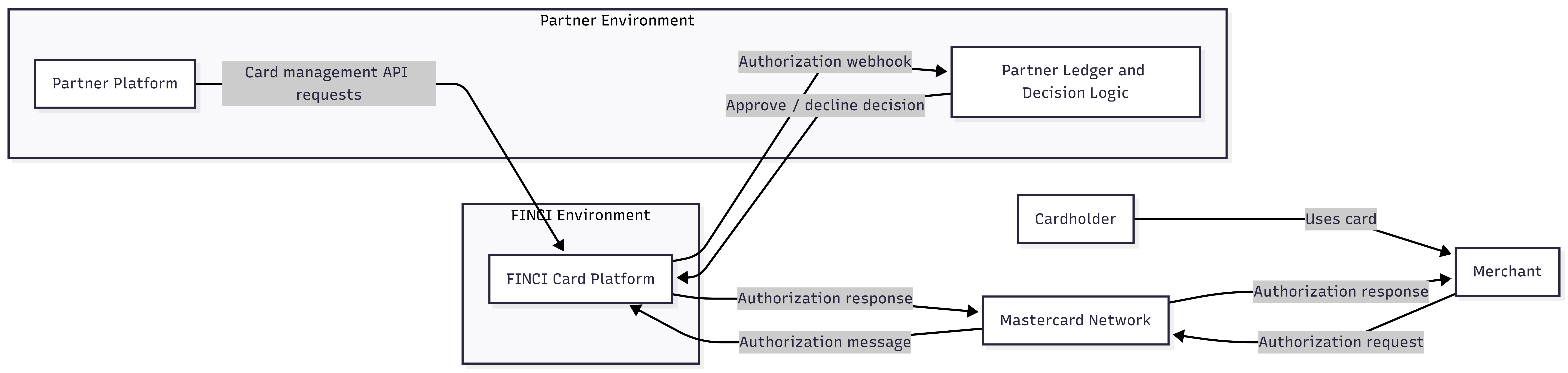
- Card API Outbound REST requests from the integrator platform to FINCI for program setup, account management, and card lifecycle operations.
- Webhooks Inbound webhooks from FINCI to the integrator for real-time authorization and transaction updates.
System overview
The diagram below shows one common integration pattern used across FINCI card programs.
Implementation journey
- Confirm the target program model, service scope, and responsibility split.
- Start the non-technical onboarding process through
https://www.finci.com/open/. - Complete FINCI onboarding and compliance review for the target program.
- Receive sandbox access and authentication materials, and complete sandbox IP whitelisting for the integrator environment.
- Configure API connectivity and authentication, together with webhook connectivity, in the sandbox environment, with FINCI integration support where needed.
- Implement the core setup flow for the target program and data model.
- Implement the agreed authorization flow and, if integrator-managed decisioning is in scope, the real-time decisioning path through FINCI webhooks.
- Implement the transaction event handling required for the agreed program scope.
- Complete sandbox validation and confirm successful integration testing.
- Submit the signed production access confirmation document, together with the required production IP whitelist details, to obtain production approval and live environment access from FINCI.
- Complete production confirmation testing in the live environment before final go-live.
- Confirm operational readiness and complete the final go-live readiness review before production launch.
Synchronous versus asynchronous work
The integration combines two modes:
- Synchronous Card API requests for setup and management actions.
- Asynchronous Webhook deliveries for authorization decisions and transaction updates.